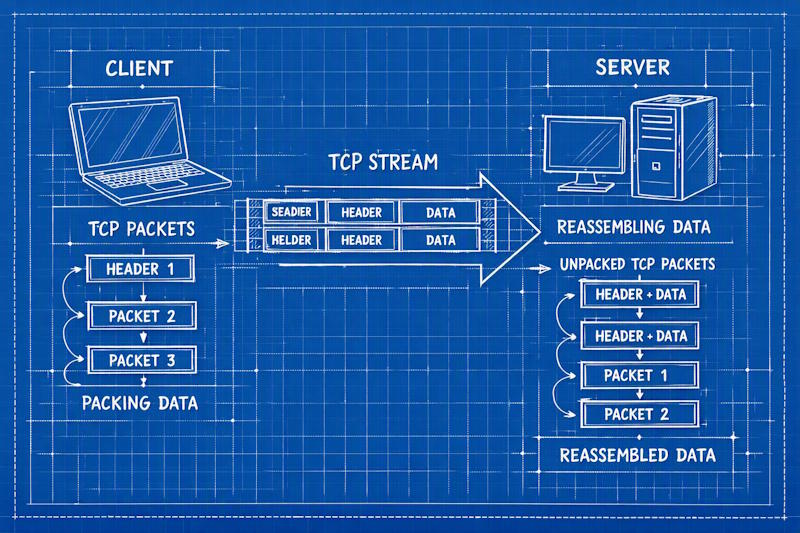
TCP framing with System.IO.Pipelines
Background
Over years of working in banking systems, I have used TCP framing to communicate with mainframes, integrate with HSMs (Hardware Security Modules), and build ISO8583 financial message processors. In modern software development, developers typically rely on HTTP, REST, or gRPC for communication. Back in the ’80s and ’90s, many mainframe-style financial systems used TCP with framed payloads to communicate with other financial systems and devices.
Today, there are still mainframes processing transactions in many financial organisations. If you are developing software that needs to communicate with these mainframes, you will likely need TCP framing.
Even on core replacement projects where the goal is to completely remove the mainframe from an organisation, the first step is often to gain more access to it. That enables functionality to be redeveloped on a modern system while keeping data synchronised so that the legacy system can continue running, which supports a gradual replacement rather than a big-bang cutover.
Alternatively, if you wanted to build a web server or even do light-weight communication to or from an ESP32, then TCP sockets may be the way to go.
I have developed a small .NET 10 sample to demonstrate TCP framing. The project is here: https://github.com/andyvans/TcpFraming
TCP is a byte stream. It guarantees order and integrity, but it does not preserve application-level message boundaries. A single send can arrive in multiple receives, and multiple sends can arrive in one receive. If your code assumes one read equals one message, it may seem fine on localhost and then fail in production.
Why framing is required
In real network conditions, two behaviours are normal:
- Fragmentation: one message can be split across reads.
- Coalescing: multiple messages can be combined into one read.
Both happen due to factors such as MTU/MSS, socket buffer behavior, and transport-level optimisations. The safe fix is to define a framing protocol so both sides agree on where each message starts and ends.
Protocol used in this sample
This sample uses a two-byte big-endian length prefix which seems be a standard approach. This has the following rules:
- The length describes the payload only. The 2 byte header is not included
- The maximum payload is 65,535 bytes (16 bit unsigned short).
- A length of zero is valid and can be used as a keep-alive.
- Big-endian keeps wire format consistent across host architectures.
+--------+--------+----------------------------+
| len hi | len lo | payload (len bytes)        |
+--------+--------+----------------------------+
   0        1        2 .. 2+len-1
In this example UTF-8 is used on the console for text and emoji support, but the framing protocol is binary-safe and can carry any payload.
System.IO.Pipelines
System.IO.Pipelines is a library designed to make high-performance I/O in .NET easier. It came about as part of the .NET Kestrel web server development. The problem it solves is described here quite nicely. When switching existing TCP streaming code to use Pipelines you quickly realise how much tidier the code becomes.
Solution structure
The repository is split into three small projects https://github.com/andyvans/TcpFraming:
TcpFraming.Core:FramingProtocolencode/decode logic.TcpFraming.Server: echo server bound to127.0.0.1:8087.TcpFraming.Client: console sender/receiver.
Client
.\TcpFraming.Client.exe 127.0.0.1 8087
Connecting to 127.0.0.1:8087
Type messages and press Enter to send (Ctrl+C to exit):
hello world! 🌍
Sent message (18 bytes)
Received response (32 bytes) in 15.4205ms : Echoing back: hello world! 🌍
Server
.\TcpFraming.Server.exe 127.0.0.1 8087
Listening on 127.0.0.1:8087
[[::ffff:127.0.0.1]:65247]: connected
Received message (18 bytes): hello world! 🌍
How the code works
Writing — FramingProtocol.WrapMessageForHost
This method adds the two-byte network-order length prefix and copies the payload after it:
public static byte[] WrapMessageForHost(byte[] message)
{
    if (message.Length > MaxMessageSize)
        throw new ProtocolViolationException($"Message length is greater than {MaxMessageSize} : {message.Length}");

    var requestLength = (ushort)message.Length;

    var buffer = new byte[requestLength + FramingSize];
    // Write the length header in network byte order (big-endian)
    BinaryPrimitives.WriteUInt16BigEndian(buffer, requestLength);
    Buffer.BlockCopy(message, 0, buffer, FramingSize, requestLength);

    return buffer;
}
That pattern is exactly what the sending side in the sample does before writing to the socket.
Reading — FramingProtocol.TryGetMessage
This method checks the header, validates the length, and only returns a message when a full frame has arrived:
public static bool TryGetMessage(ref ReadOnlySequence<byte> buffer, [NotNullWhen(true)] out byte[]? message)
{
    message = null;

    var bufferSize = buffer.Length;

    // Check we have received the frame size
    if (bufferSize < FramingSize) return false;

    // Read the two-byte header in network byte order (big-endian), without allocating
    Span<byte> header = stackalloc byte[FramingSize];
    buffer.Slice(0, FramingSize).CopyTo(header);
    int length = BinaryPrimitives.ReadUInt16BigEndian(header);

    // Sanity check for very large packets, to prevent denial-of-service attacks
    if (length > MaxMessageSize) throw new ProtocolViolationException($"Message length {length} is larger than maximum message size {MaxMessageSize}");

    // Zero-length packets are allowed as keep-alives
    if (length == 0)
    {
        // Move the buffer past the frame size
        buffer = buffer.Slice(FramingSize);
        return false;
    }

    // Do we have a complete message?
    if (bufferSize < FramingSize + length) return false;

    // We have the complete message
    message = buffer.Slice(FramingSize, length).ToArray();

    // Move the buffer past the frame size and message
    buffer = buffer.Slice(FramingSize + length);

    return true;
}
while (FramingProtocol.TryGetMessage(ref buffer, out var message))
{
    // Process the message and echo it back to the client.
    await ProcessMessageAsync(message, stream);
}
The method returns false when the header is incomplete or the payload has not fully arrived yet. That is the fragmented case: the caller loops, reads more from the socket, and tries again.
The read loop — System.IO.Pipelines
Both server and client wrap the NetworkStream in a PipeReader. That keeps the framing logic separate from the socket read loop and makes it easier to handle coalesced or fragmented input.
while (true)
{
    var result = await reader.ReadAsync();
    var buffer = result.Buffer;

    while (FramingProtocol.TryGetMessage(ref buffer, out var message))
    {
        // Process the message and echo it back to the client.
        await ProcessMessageAsync(message, stream);
    }

    // Tell the PipeReader how much of the buffer has been consumed.
    reader.AdvanceTo(buffer.Start, buffer.End);

    // Stop reading if there's no more data coming.
    if (result.IsCompleted)
    {
        break;
    }
}
After each read cycle, the reader is advanced to mark what was consumed and what was examined:
reader.AdvanceTo(buffer.Start, buffer.End);
The two arguments mean different things and are the most commonly misunderstood part of the API:
consumed— bytes the pipe may discard. Data before this point is gone for good.examined— bytes already inspected. This tells the pipe that anotherReadAsyncshould not return until more data than this has arrived.
Closing point
TCP socket communication is typically not the first tool to reach for. However it works very well when dealing with legacy software or equipment, and can be extremely fast because there is minimal application-layer overhead.